Your retirement account can be an attractive target for scammers who continue to find new ways to try to impersonate government agencies, such as NYSLRS or the Social Security Administration. Protect yourself from scams by learning to distinguish fake messages from official NYSLRS communications.
How Scams Work
Scammers pretend to be an agency or organization you already know to gain your trust. They use similar logos or imagery in correspondence. They may contact you from an email address that mimics—but isn’t identical to—those used by employees of the actual organization. Some can even make a real agency’s phone number appear on caller ID (known as spoofing).
Usually, once they contact you, they claim there is a problem (or a prize or a new benefit available) requiring your immediate attention. But here’s the catch: to fix the problem or receive the reward, the imposter needs you to pay them a fee or provide personal data, such as your Social Security number or bank account information. They may even threaten you with legal action, a suspension of your benefits or arrest if you fail to act.
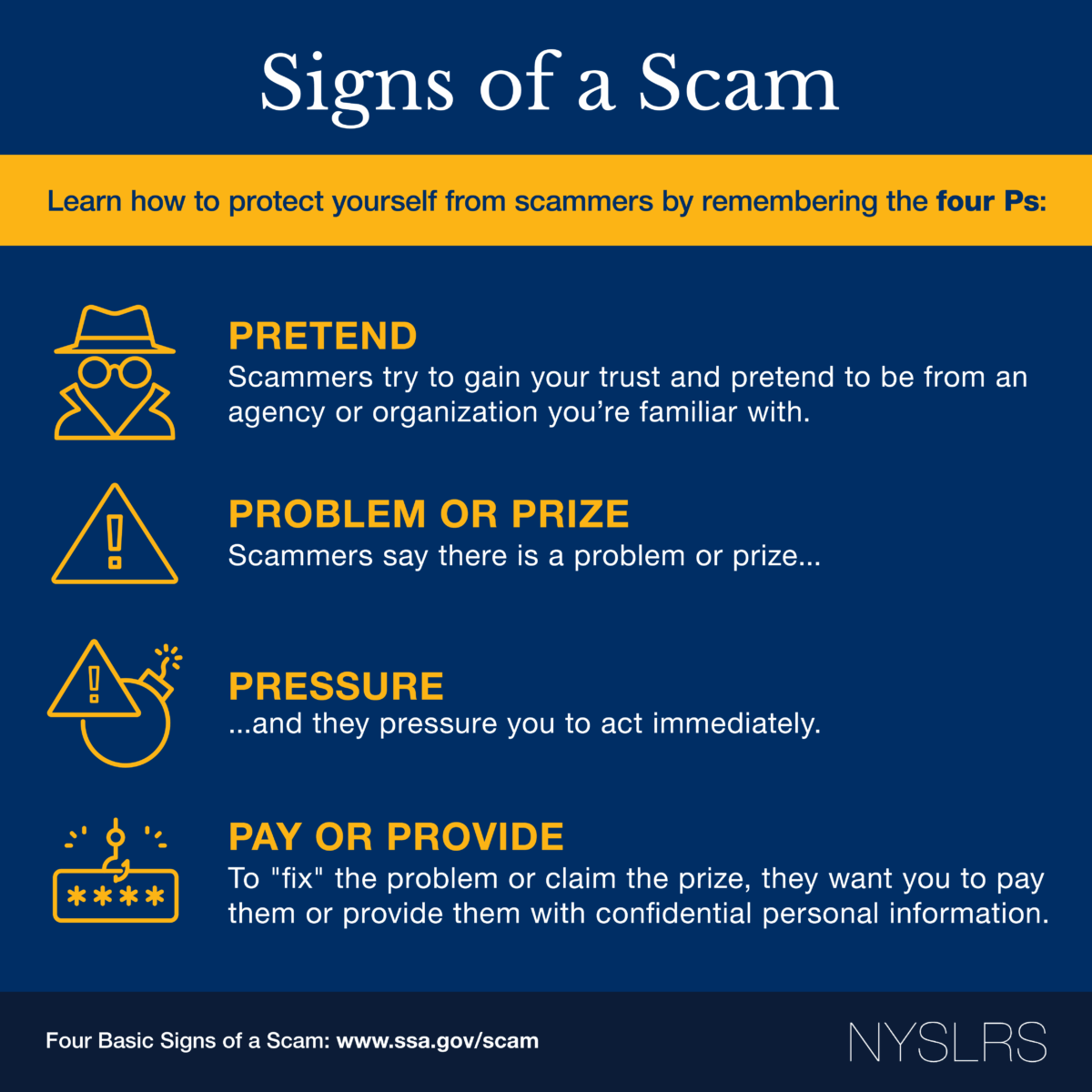
If someone contacts you and you notice these signs of a scam, remain calm. Hang up the phone or delete the message if you feel like something is off. It’s the easiest way to avoid accidentally giving away personal information.
Scammers have also attempted to create a fake mobile app or website, which looks similar to Retirement Online, aimed to trick users and capture login credentials. Please be aware, we currently do not have a mobile app. Protect yourself from these scams by accessing Retirement Online from the NYSLRS website and avoid using search engines to find a link for the login page.
AI: A New Tool for Scams
You should also be aware of an emerging threat—artificial intelligence (AI), which allows computers to mimic certain human behaviors, such as speech and writing. Using AI, scammers can personalize phishing emails, making it harder to recognize a fraudulent communication. AI may even be able to impersonate the voice of a family member or friend, making you think they are in trouble or need money.
Here are some things you can do to protect yourself from AI-enhanced scams.
- Don’t share sensitive information through text or social media.
- Don’t send or transfer money to unknown locations.
- Consider designating a safe word for your family to use to identify themselves and share that word with family members and close contacts.
- When in doubt, hang up and call your loved one back.
Doing Business With NYSLRS
To protect yourself from potential scams and keep your personal information secure, use your NYSLRS ID to verify your identity when doing business with NYSLRS, instead of providing your Social Security number. You can find your NYSLRS ID by signing in to your Retirement Online account, or by checking your annual statement or other correspondence from NYSLRS.
Generally, NYSLRS will only call you if we are following up on a previous communication from you—a phone call, secure email message, Retirement Online request, form or letter. If you haven’t completed a transaction or submitted changes recently, be wary of unexpected calls or requests for your NYSLRS information.
Make sure you review the communications you receive from NYSLRS. We send you letters or emails (depending on your delivery preference in Retirement Online) whenever you update your Retirement Online account or benefit information. If you receive a letter or email about an account change you did not make, contact us immediately.
Keep Your Retirement Online Account Secure
Retirement Online is the fastest and most convenient way to access your retirement account information and conduct business with NYSLRS. And it’s safe to use—it has the same security safeguards used for online banking and by other financial institutions. Here are steps you can take to help ensure your Retirement Online account stays secure:
- First, if you don’t have an account, learn more about Retirement Online and click Register Now.
- Choose a strong password.
- Once you have an account, keep your username and password in a safe place, and don’t share them with anyone. NYSLRS will never ask for your password.
- Sign in to Retirement Online at least once a year and update your password so it doesn’t expire. If you forgot your user ID or password, don’t worry—from the customer login page, you can:
- Click the Forgot ID link to look up your user ID.
- Click the Forgot Password link to reset your password.
You’ll need to identify yourself and answer security questions you set when you signed in for the first time.
For step-by-step instructions, read our Forgot User ID and Forgot Password guides.
- Update your delivery preference to receive an email notifying you when you have correspondence to view in Retirement Online. That way, when there are changes to your account, you’ll receive an email notifying you instead of waiting for printed notices through the mail.
- Sign in to Retirement Online.
- Look under My Profile Information.
- Click update next to ‘Contact by.’
- Choose Email from dropdown.
For more information, read our Retirement Online Tools and Tips blog post.