

Tax season is here. If you received a distribution of retirement benefits from NYSLRS last year and need to report it as income on your taxes, you don’t have to wait for the mail—1099-R tax forms are available online.
While NYSLRS pensions are not subject to New York State or local income tax, most are subject to federal income tax.
Beneficiaries who received a death benefit and members who took a taxable loan or withdrew their contributions may also be subject to federal income tax.
If NYSLRS is required to report your distribution to the Internal Revenue Service (IRS), we provide a 1099-R tax form to you for filing your taxes.
We distribute 1099-R tax forms annually based on your delivery preference:
Mail: We mail printed 1099-Rs by January 31. (Note: The default delivery preference is mail.)
Email: We make 1099-Rs available in Retirement Online sooner than printed copies are mailed—we will notify you by email in mid-January. (Note: You will not receive a printed 1099-R in the mail.)
Select an option from Year dropdown. (Note: 2025, 2024 and 2023 are currently available online.)
Click Generate button.
If you have one 1099-R, the document will open in a new browser tab. If you have more than one 1099-R, the documents will compile into a zip file and download on to your computer. Go to your Downloads folder and double-click on the zip file to access the documents.
Please check your browser settings and disable pop-up blockers to ensure your 1099-R can be generated. By default, your browser may block pop-ups, which may prevent a new tab from opening or the file from downloading.
If you don’t have an account or for help signing in to an existing account, check out our Retirement Online Tools and Tips , for step-by-step instructions to register, reset your password, unlock your account and more.
Understanding Your 1099-R
Your tax form includes:
The total amount (before taxes and deductions) paid to you for the year indicated on the form.
The taxable portion of your benefit.
The amount of federal income tax withheld for the year indicated on the form and paid to the IRS on your behalf.
For more information, check out our interactive 1099-R guide. It walks you through a sample and offers a short explanation of each box on the form.
Get an Email Notification When 1099-R Tax Forms Are Available Online
You can get your 1099-R online sooner than printed copies are mailed. Update your delivery preference to email and when your 1099-R is available, we’ll send an email notifying you to sign in to Retirement Online.
Over the last year, NYSLRS has seen an increase in check fraud and the delayed receipt of pension checks sent by mail. That is why we are urging all retirees and beneficiaries who still receive pension checks by mail to enroll in our Direct Deposit program, just as the Social Security Administration requires you to receive that benefit.
Direct deposit is fast, convenient and secure. Your pension payment will be deposited directly into your bank account on the last business day of each month and available to you immediately. No more waiting for a check in the mail or having to travel to the bank to cash it. And you won’t need to worry about your check being lost or stolen.
Use Retirement Online to Sign Up for Direct Deposit
Retirement Online is the fastest and most secure way to sign up for direct deposit.
From Account Homepage, look under I want to… (located at the top right)
Click Update Direct Deposit link.
Follow steps to add your bank account number and routing number.
If you have a joint account holder on your bank account, you’ll need to print and complete the Electronic Funds Transfer Direct Deposit Enrollment Application (RS6370) and have your joint account holder sign the form. It’s best to do this in advance so you can upload the completed form while signing up in Retirement Online. (However, you can upload the completed form later.)
Other Ways to Sign Up for Direct Deposit
If you don’t have a Retirement Online account, you can download and complete an Electronic Funds Transfer Direct Deposit Enrollment Application (RS6370). However, please be aware, you must attach a voided check or have a bank representative complete Section 3 of the form. Paper forms also take longer to process.
Attach your completed form using the Browse… button.
Or by mail:
NYSLRS 110 State St. Albany, NY 12244-0001
Keep Your Direct Deposit Information Updated
It’s important to notify NYSLRS as soon as possible if you change financial institutions or accounts. Retirement Online is the fastest and most convenient way to update your bank account information. Your changes will generally be applied to your next month’s pension payment. Our Pension Payment Calendar lists the dates your pension payment will be deposited into your bank account each month.
With direct deposit, your pension payment is deposited directly into your bank account on the last business day of each month. It’s fast, convenient and secure. And if you change banks or open a new account, you can avoid delays or any interruption in receiving your pension payments by using Retirement Online to update your direct deposit information.
Keep Your Direct Deposit Information Updated
It’s important to notify NYSLRS as soon as possible if you change financial institutions or accounts. After you submit changes, we’ll send you a confirmation letter with the effective date of the change.
Important: You should keep your current bank account open until you receive our letter confirming the date we will begin depositing your pension payment into your new account.
Use Retirement Online to Update Your Direct Deposit Information
Retirement Online is the fastest and most convenient way to update your direct deposit information. Your changes will generally be applied to your next month’s pension payment.
Follow steps to update your bank account number and routing number.
If you have a joint account holder on your account, you’ll need to print and complete the Electronic Funds Transfer Direct Deposit Enrollment Application (RS6370) and have your joint account holder sign the form. It’s best to do this in advance, so you can upload the completed form while updating your information in Retirement Online. However, you can upload the completed form later.
Other Ways to Update Your Direct Deposit Information
You can update your direct deposit information by completing an Electronic Funds Transfer Direct Deposit Enrollment Application (RS6370) and submitting it using our secure contact form or by mail. Please note, using a paper form will take longer for the information to reach us, and it may take up to 60 days to apply your changes. Be sure to attach a voided check or have a bank representative complete section three of the form.
If you are updating account numbers but not changing banks, your bank can fax your direct deposit changes to 518-473-5323. A bank representative must include the following information on their letterhead:
Your name;
Your NYSLRS ID or retirement number;
Old and new account numbers and bank routing number; and
A bank representative’s signature.
Note: If your bank faxes your request, you don’t have to update your direct deposit information in Retirement Online or submit a paper application.
Sign Up for Direct Deposit
With direct deposit, your pension payment is deposited directly into your bank account—it’s fast, convenient and secure. You’ll avoid mailing delays, trips to the bank in bad weather and standing in line to cash a check. And you won’t need to worry about your check being lost or stolen.
If your ex-spouse will receive a share of your pension and other retirement benefits, NYSLRS must have an approved Domestic Relations Order (DRO) on file. A DRO is a court order specifying how benefits should be divided. It’s important to complete and file the DRO with NYSLRS well before your retirement date to avoid changes or delays in payments. Questions about the consequences of not filing a DRO on time should be addressed to an attorney.
Death Benefits and Your Beneficiaries
As of July 7, 2008, beneficiary designations for certain death benefits are automatically revoked when a divorce, annulment or judicial separation becomes final.
Ordinary Death Benefit
If you die in active service (before retiring), your beneficiaries may be entitled to an ordinary death benefit.
Accidental Death Benefit
If you die as a result of an on-the-job accident, an accidental death benefit may be payable to certain beneficiaries. The beneficiaries of this benefit are designated by law, and only those beneficiaries may receive this benefit—even if there is a DRO.
Post-Retirement Death Benefit
If you die after retiring, you may be covered by a post-retirement death benefit, which provides a one-time, lump sum payment to your beneficiaries.
Your Beneficiaries
If you are divorced, it is especially important to review your beneficiary designations to ensure your benefits will be distributed according to your wishes and your divorce agreement.
If your ex-spouse is awarded a portion of your death benefits, a DRO will specify how much your ex-spouse will receive and direct you to name your ex-spouse as a beneficiary. You should update your beneficiaries and choose additional beneficiaries for the remainder of any benefits. However, if you do not update your beneficiary designations or if your beneficiary designations conflict with the terms of the DRO, the DRO will take precedence.
Retirement Online is the fastest and most convenient way to view and update your beneficiaries.
Eligible NYSLRS members may take out a NYLSRS loan against their retirement contributions. However, even if you are eligible, a DRO may be written to prohibit you from taking future loans.
If you retire with an outstanding loan balance, your pension will be reduced. The ex-spouse’s share of the pension will also be reduced unless the DRO specifically states the ex-spouse’s share should be calculated without reference to outstanding loans.
Contribution Refunds
Occasionally, NYSLRS may refund a member’s contributions because of a tier reinstatement, membership withdrawal or membership transfer. Some members are eligible to make voluntary contributions and withdraw them as excess contributions. Generally, if a DRO doesn’t mention a contribution refund, the member will receive the full amount.
For More Divorce Information
Visit our Divorce and Your Benefits page for more information, including how divorce can affect your service credit, disability benefits or annual cost-of-living adjustment.
Retirement Online is the fastest way to manage your NYSLRS account. Skip printing forms, having them notarized and sending them through the mail. When you submit your requests online, NYSLRS has them immediately, and your changes will be completed more quickly. It’s convenient and secure. Also, your important documents will be available online, sooner than printed copies are mailed.
If you don’t have an account or for help signing in to an existing account, check out our Retirement Online tools and tips for step-by-step instructions to register, reset your password, unlock your account and more.
Monthly benefit amount after credits and deductions;
Payment method; and
The date of the last payment you received.
Update Your Contact Information
It’s important we have your current contact information so you receive the tax information, news, correspondence and statements we send you.
To update your contact information:
Look under My Profile Information.
Click update next to email address, mailing address or phone number.
You can even schedule an address change, so you’ll get NYSLRS mail at your seasonal home without interruption. Select or enter the effective date in the Change As Of field.
Get Email Notifications for Important Documents
You can help us ‘go green’ and reduce paper waste by choosing email as your delivery preference for correspondence and other important documents. When you have something to view, we’ll send an email notifying you to sign in to Retirement Online. And it will save time—you’ll get access to your important documents sooner than printed copies are mailed.
To update your delivery preferences:
Look under My Profile Information.
Click update next to ‘Contact by,’ ‘1099-R Tax Form Delivery by’ or ‘Retiree Annual Statement by.’
Choose Email from dropdown.
Be sure the email address listed in your profile is current.
If you choose email as your delivery preference, you will not receive a printed copy in the mail.
View Your Pension Pay Stubs
Your pension pay stub gives you valuable insight into your monthly pension payment, including a breakdown of credits and deductions. Throughout the year, you can access your pay stubs online to see year-to-date totals.
To view your pension pay stubs:
Look under I want to… (located at the top right).
Click View Pension Check link.
Select date of the pension payment to view.
Change Your Direct Deposit Information
Whether you’ve switched banks or need to move your deposits to a different account, you can make those changes quickly with Retirement Online. Your changes will generally be applied to your next month’s pension payments.
To update your direct deposit information:
Look under I want to… (located at the top right).
Click Update Direct Deposit link.
Follow steps to update your bank account number and routing number.
Not using direct deposit yet? Don’t wait to receive a check in the mail—direct deposit is fast, convenient and secure. Sign up for direct deposit now and get your money sooner.
Adjust Your Federal Tax Withholding
Retirement Online is the fastest and most convenient way to complete the W-4P Form and update your federal tax withholding for your NYSLRS pension.
Look under My Account Summary.
Click Update My W-4P Tax Information button.
Follow steps to update your withholding.
If you update your federal tax withholding online by the middle of the month, your changes will generally be applied to that month’s pension payment.
For more information, including instructions for updating your withholding, visit our Taxes and Your Pension page.
Get Your 1099-R Tax Form
While your NYSLRS pension is not subject to New York State or local income tax, most NYSLRS pensions are subject to federal income tax. Each year, we provide a 1099-R tax form with the information you need to file your taxes. We mail printed 1099-Rs by January 31. However, we make 1099-Rs available in Retirement Online sooner than printed copies are mailed.
To view, save or print your 1099-R tax form:
Look under My Account Summary.
Click Manage My 1099-R Tax Forms button.
Select an option from Year dropdown.
Click Generate button.
Generate a Pension Income Verification Letter
Some organizations may ask for a letter verifying your pension income—maybe for housing or as part of an application for the Home Energy Assistance Program (HEAP). Retirement Online is the fastest way to get a pension income verification letter.
Look under I want to… (located at the top right).
Click Generate an Income Verification Letter link.
Manage Your Beneficiaries
Most NYSLRS retirement plans provide a post-retirement death benefit for beneficiaries of eligible retirees who die after retiring directly from service or within one year of leaving public employment.
It’s a good idea to review your beneficiaries from time to time to make sure they reflect your current wishes. The beneficiary you named before might not be the one you would choose today. You should also review the contact information for your named beneficiaries so we can find them when needed.
To add or remove beneficiaries or update their contact information:
Look under My Account Summary.
Click View and Update My Beneficiaries button.
Get Your Retiree Annual Statement
Your Retiree Annual Statement provides a year-end summary of your pension payments for the last calendar year, including the total amount you received and a breakdown of credits, deductions and taxes. We mail printed Retiree Annual Statements by the end of February. However, we make Statements available in Retirement Online sooner than printed copies are mailed.
To view, save or print your Statement:
Look under My Account Summary.
Click View My Retiree Annual Statement button.
If Retirement System is blank, click Look Up icon and select ERS or PFRS from dialog box.
Click Look Up icon next to Calendar Year field and select an option from dialog box.
NYSLRS retirement plans provide death benefits for beneficiaries of eligible members who die before retiring.
It’s important to name beneficiaries and review them periodically. Life circumstances change and a beneficiary you named before might not be one you would choose today. For instance, you may have a new partner or you may have children now. And NYSLRS can only pay a death benefit to the beneficiaries you’ve named.
Your primary beneficiary will receive your death benefit. You can list more than one primary beneficiary. If you do, they will share the benefit equally. Or, you can choose different percentages for each beneficiary, which must total 100 percent. (Example: John Doe, 50 percent; Jane Doe, 25 percent; and Mary Doe, 25 percent.)
A contingent beneficiary will only receive a benefit if all your primary beneficiaries die before you do. If you list multiple contingent beneficiaries, they will share the benefit equally unless you choose different percentages.
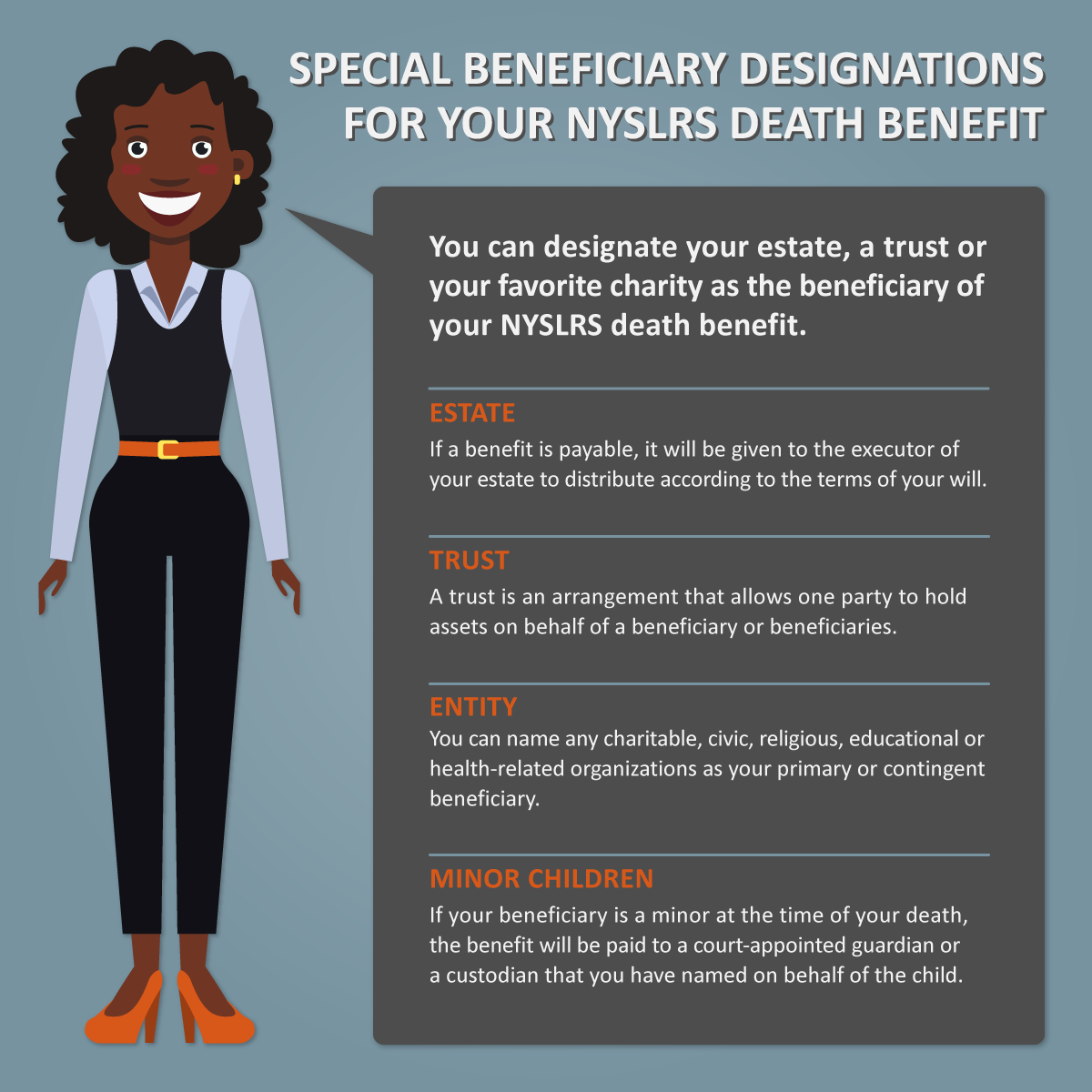
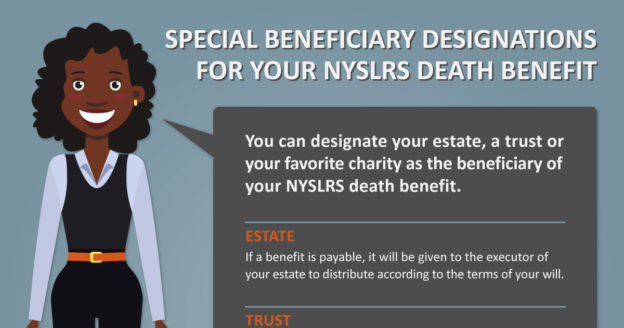
Special Beneficiary Designations
Your beneficiary doesn’t have to be a person. You can name your estate, a trust or a charity as your beneficiary.
Estate. When you die, your estate is the money and property you owned. Your death benefit will be given to the executor of your estate to be distributed according to the terms of your will. You can name your estate as the primary or contingent beneficiary of your death benefit. If you name your estate as the primary beneficiary, do not name a contingent beneficiary.
Trust. You can name a trust as a primary or contingent beneficiary if you have a trust agreement or provided for a trust in your will. The trust itself would be your beneficiary, not the individuals for whom you established the trust. (Speak with your attorney if you’re thinking about making your trust a beneficiary.)
Entity. You can also name any charitable, civic, religious, educational or health-related organization as a beneficiary.
Minor children. If your beneficiary is under the age of 18 at the time of your death, your benefit will be paid to the child’s court-appointed guardian. You may instead choose a custodian to receive the benefit on the child’s behalf under the Uniform Transfers to Minors Act (UTMA). Custodians can be designated in Retirement Online, or you can contact us for more information and the appropriate form before making this type of designation.
Keep Your Beneficiaries Up to Date with Retirement Online
You can change your beneficiaries at any time. In addition to adding or removing them to reflect your current wishes, you should review the contact information for your named beneficiaries so we can find them when needed.
The fastest way to view or update your beneficiaries is in Retirement Online.
When it comes to managing your NYSLRS account, Retirement Online is the fastest way to do it. Skip printing forms, having them notarized and sending them through the mail. When you submit your requests online, NYSLRS has them immediately, and your changes will be completed more quickly. It’s convenient, and it’s secure.
Get Email Notifications for Important Documents and Help Us ‘Go Green’
You can help us ‘go green’ and reduce paper waste by choosing email as your delivery preference for correspondence and other important documents. When you have something to view, we’ll send an email notifying you to sign in to Retirement Online. And it’ll save time—you’ll get access to your important documents sooner than printed copies are mailed.
To update your delivery preferences:
Look under My Profile Information.
Click update next to ‘Contact by’ or ‘Member Annual Statement by.’
Choose Email from dropdown.
Be sure the email address listed in your profile is current.
If you choose email as your delivery preference, you will not receive a printed copy in the mail.
Update Your Contact Information
It’s important we have your current contact information so you receive the news, correspondence and statements we send you.
To update your contact information:
Look under My Profile Information.
Click update next to email address, mailing address or phone number.
If you don’t already have an email address on file, please provide it so we can contact you quickly with important information, such as a change to your benefits. Use a personal email address you will have access to before and after you retire, not a work email address.
Manage Your Beneficiaries
NYSLRS retirement plans provide death benefits for beneficiaries of eligible members who die before retiring. It’s a good idea to review your beneficiaries from time to time to make sure they reflect your current wishes. The beneficiary you named before might not be the one you would choose today. You should also review the contact information for your named beneficiaries so we can find them when needed.
To add or remove beneficiaries or update their contact information:
Look under My Account Summary.
Click View and Update My Beneficiaries button.
Estimate Your Pension
How much will your pension be? It’s an important question as you plan for retirement. In just a few steps, most members can use Retirement Online to estimate their pension based on the most up-to-date account information we have on file, then save or print the estimate. You can enter different retirement dates and beneficiaries to see how those choices would affect your benefit and help you choose the retirement date that’s right for you.
Look under My Account Summary.
Click Estimate My Pension Benefit button.
Apply for a Loan and Manage Loan Payments
The fastest way to apply for a loan is in Retirement Online. You can see how much you are eligible to borrow, what the repayment amount would be and whether your loan will be taxable—all before you apply.
Look under My Account Summary.
Click Apply for a Loan button.
If you have an existing loan, you can check your current loan balance and adjust your payment amount or make an additional one-time payment.
Look under My Account Summary.
Click Manage My Loans button.
Request Additional Service Credit
You may be able to request additional service credit if you worked for your current or another public employer before joining NYSLRS or if you served in the U.S. Armed Forces and received an honorable discharge from active military duty. In most cases, you have to pay for additional service credit. But because service credit is a factor in the calculation of your retirement benefits, purchasing additional service credit will usually increase your pension. You must submit your request before retirement, and you should do it as early in your career as possible—the sooner you purchase your credit, the less it will generally cost.
To submit your request online:
Look under My Account Summary.
Click Manage My Service Credit Purchases button.
Click Request Additional Service Credit link.
Get Your Member Annual Statement
Your Member Annual Statement is a valuable snapshot of your NYSLRS membership and benefits as of March 31, the end of the state fiscal year. You can access Statements dating back to 2020 online.
Look under My Account Summary.
Click View MyMember Annual Statement button.
Statements are made available online each year in early May, sooner than printed copies are mailed—update your delivery preference to get notified.
Generate a Mortgage Verification Letter
If you are applying for a mortgage and need a summary of your NYSLRS account information, you can quickly generate a mortgage verification letter online. The document will show your contribution balance, the date and amount of your last loan, and if you have an existing loan, the current balance, the payroll deduction amount and the interest rate.
Look under I want to… (located at the top right).
Click Generate Mortgage Verification Letter link.
Apply for Retirement
When you are ready to retire, avoid the hassle of paper forms and apply online. You’ll be able to see an estimate of your pension, select your payment option, enter federal tax withholding information, sign up for direct deposit, submit required documents and much more. Learn more about the advantages and how to apply for retirement in Retirement Online.
If you leave public employment with less than ten years of service credit, you can withdraw your membership online and request a refund of your contributions. However, this will end your NYSLRS membership. Before you submit a withdrawal application, we recommend speaking with a customer service representative by sending a message using our secure contact form.
NYSLRS provides pension benefits to more than 520,000 retirees and beneficiaries. You can find our retirees in every state in the US and in countries all around the world. However, most live right here in New York State.
Nearly 79% of NYSLRS Retirees Stay in New York
The vast majority of NYSLRS retirees—nearly 79 percent—stay in New York State, and their pension dollars flow right back into our communities. Retirees in New York pay local property and sales taxes. Their spending supports local businesses, generates thousands of jobs and stimulates the economy.
Where in New York do these retirees call home?
Long Island is home to more than 66,000 retirees and beneficiaries. Suffolk County has the most and Nassau County has the third most benefit recipients of the counties outside of New York City. (The City, which has its own separate retirement systems for municipal employees, police and firefighters, has more than 24,000 retirees and beneficiaries.)
Erie County, which includes Buffalo, has the second most retirees—nearly 34,000. Albany County, home to the State capitol, is ranked fourth, with more than 20,000. Monroe, Westchester, Onondaga, Saratoga, Dutchess and Oneida Counties round out the top ten.
All told, retirees and beneficiaries in the top ten counties received $7 billion in retirement benefits in the fiscal year ending March 31, 2024.
Hamilton County has the fewest retirees. But, in this sparsely populated county in the heart of the Adirondacks, those 545 retirees represent about 10 percent of the county’s population and received $12.9 million in retirement benefits in the fiscal year ending March 31, 2024.
NYSLRS Retirees in the United States
NYSLRS retirees are found in every state. Florida, not surprisingly, is the second choice for retirees after New York. Roughly 41,000 call the Sunshine State home. North Carolina is third, followed by New Jersey and South Carolina. North Dakota has the fewest retirees and beneficiaries—only 23.
NYSLRS Retirees Around the World
There are 649 NYSLRS retirees and beneficiaries living around the world but the most common countries are:
Let’s take a look inside the New York State and Local Retirement System (NYSLRS) and what makes it one of the largest and best retirement systems in the United States.
NYSLRS administers two distinct systems. They are:
The Employees’ Retirement System (ERS) with 677,604 members; and
The Police and Fire Retirement System (PFRS) with 36,198 members.
In addition, NYSLRS provides pension benefits to more than 520,000 retirees and beneficiaries. Altogether, that’s more than 1.2 million participants!
New York State Common Retirement Fund
State Comptroller Thomas P. DiNapoli is administrative head of NYSLRS and trustee of the New York State Common Retirement Fund, which was valued at $267.4 billion as of March 31, 2024. The Fund is widely recognized as one of the best-managed and best-funded public pension plans in the nation. Since its establishment in 1921, the Fund’s prudent investment management, solid returns, and constitutionally protected benefits have provided retirement security for generations of hard-working New Yorkers.
NYSLRS Members
How did NYSLRS earn the distinction of being one of the largest systems? Here are some facts about NYSLRS members:
527,404 active members (that is, members still on the public payroll) work for 2,988 public employers statewide.
About one-third of those active members work for New York State. The rest work for counties, cities, towns, villages, school districts and public authorities.
Nearly 94 percent of total active members are in ERS while only 6 percent of total active members are in PFRS.
Tier 6 is our largest benefit group, with more than 60 percent of all members (62.6 percent in ERS, 56 percent in PFRS).
In ERS, Tiers 3 and 4 are the second largest benefit group, with 33.1 percent of members.
While, in PFRS, Tier 2 is the second largest benefit group, with 38.7 percent of members.
For more information about our largest ERS tiers, see our blog posts, ERS Tier 6 Milestones and ERS Tiers 3 and 4 Milestones. You can also learn more about the PFRS Milestones our police and fire fighters across New York State will reach over the course of their careers.
NYSLRS Retirees and Beneficiaries
The average pension for an ERS retiree was $27,870; the average for a PFRS retiree was $62,391. But these pension payments don’t just benefit retirees and beneficiaries. During 2022, approximately 78 percent of retirees lived in New York State and were responsible for $17.3 billion in economic activity. By supporting local businesses, helping to create jobs and paying their fair share of taxes, NYSLRS retirees contribute to the economic health of our communities.
Learn More About NYSLRS
Detailed information about NYSLRS members, retirees and beneficiaries as well as the Fund’s position and performance can be found in the 2024 Annual Comprehensive Financial Report.
Note: All data is as of the State fiscal year end, March 31, 2024.
Your NYSLRS pension will provide you with a monthly benefit for the rest of your life. When you apply for retirement, you’ll have the option to choose the maximum amount payable or a reduced benefit in exchange for possibly continuing payments to a beneficiary upon your death. There’s a lot to consider when choosing a pension payment option, so let’s break this down using an example.
Meet Jane
Jane plans to retire soon and considers whether she should leave a continuing benefit to her husband or grandchildren.
No Beneficiaries
The Single Life Allowance option would provide the maximum monthly benefit payment, but all payments will stop when Jane dies, and nothing will be paid to a beneficiary.
Multiple Beneficiaries, Limited Benefit
For Jane to name both of her grandchildren as beneficiaries, she would have to select either the Five Year Certain or Ten Year Certain option—these pension payment options provide a limited benefit for multiple beneficiaries and wouldn’t reduce her pension much. If Jane dies within five or ten years of retirement, depending on which option she chooses, Jane’s grandchildren would split her pension benefit for the remainder of the five- or ten-year period. However, if Jane lives beyond the five- or ten-year period, her grandchildren would not receive a pension benefit when she dies. (Note: Jane could select one of these options and name just one beneficiary, for example, her husband instead of her grandchildren.)
Single Beneficiary, Lifetime Benefit
Jane’s husband doesn’t have his own pension, so she also considers pension payment options providing a lifetime benefit for a single beneficiary. Under the Joint Allowance — Full or Joint Allowance — Half options, Jane’s husband would receive all or half of her reduced benefit for life, depending on which option she chooses. The same goes for the Pop-Up/Joint Allowance — Full or Pop-Up/Joint Allowance — Half options. While these “pop-up” options reduce the pension a little more, they provide added security—if Jane outlives her husband, her monthly payment will increase to the maximum amount as if she selected the Single Life Allowance option at retirement.
Pension payment amounts are based on the birth dates of both the retiree and their beneficiary. So, if Jane chose one of these options and named one of her grandchildren as her beneficiary, her pension would be much lower than the amounts listed in the graphic.
Things to Consider
As you plan for your own retirement and think about whether to leave a continuing benefit for a beneficiary, you may want to consider both your spouse’s and your:
Financial needs (for instance, whether you have a mortgage, unpaid loans or other monthly payments).
Other sources of retirement income (for example, Social Security or savings).
Options for continuing benefits (for example, whether your retirement plan includes a death benefit or if you have life insurance).
Age and health at retirement.
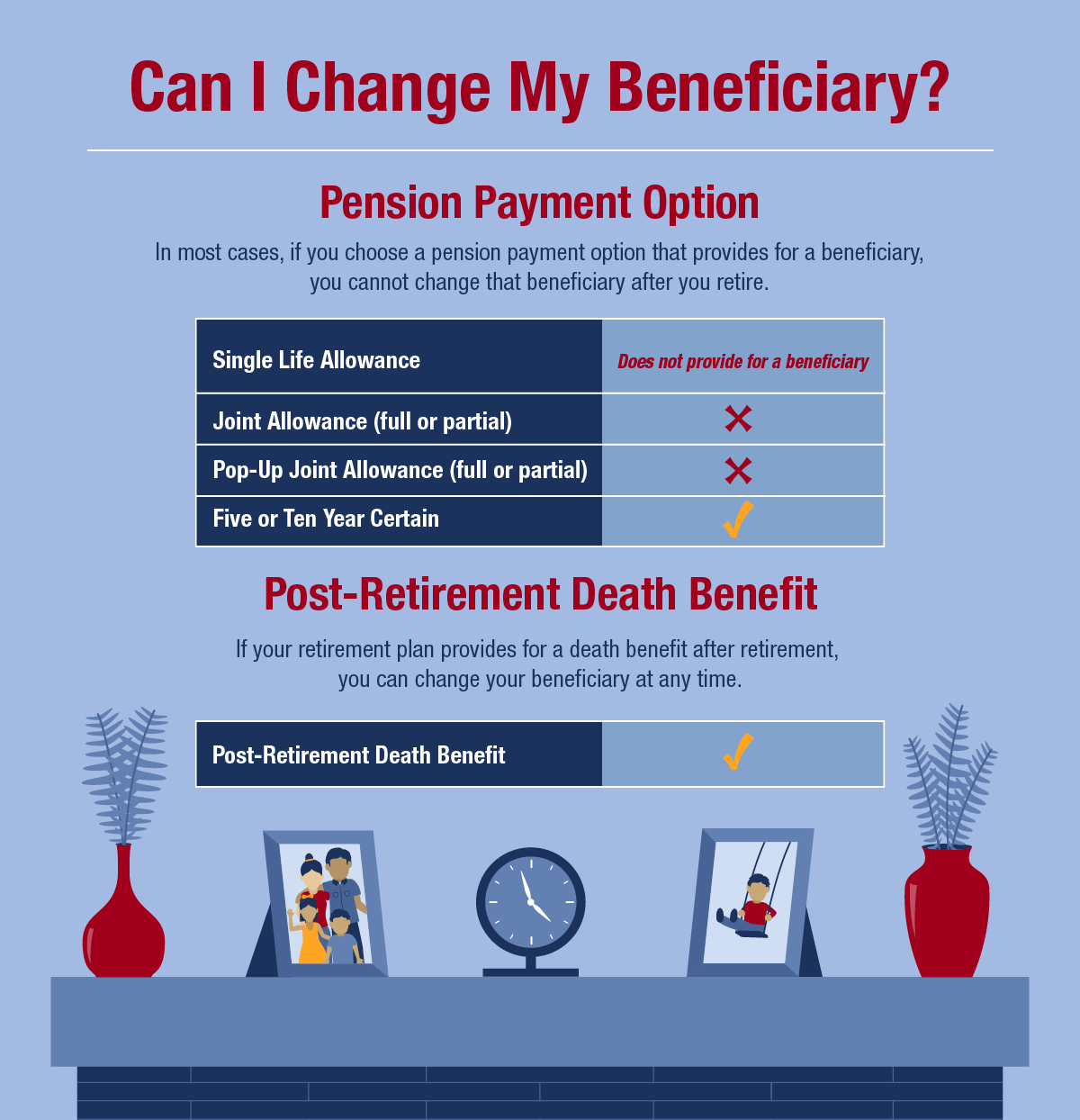
It’s also important to understand whether you can change your beneficiary after you retire. Life circumstances can sometimes change, and if you choose a pension payment option that provides a lifetime benefit, you cannot change your beneficiary.
Find your NYSLRS retirement plan publication to learn more about pension payment options and how your pension will be calculated. You can also estimate your pension using Retirement Online, and enter different retirement dates and beneficiary birth dates to see how those choices would affect your benefit. When you’re done, print your pension estimate or save it for future reference.