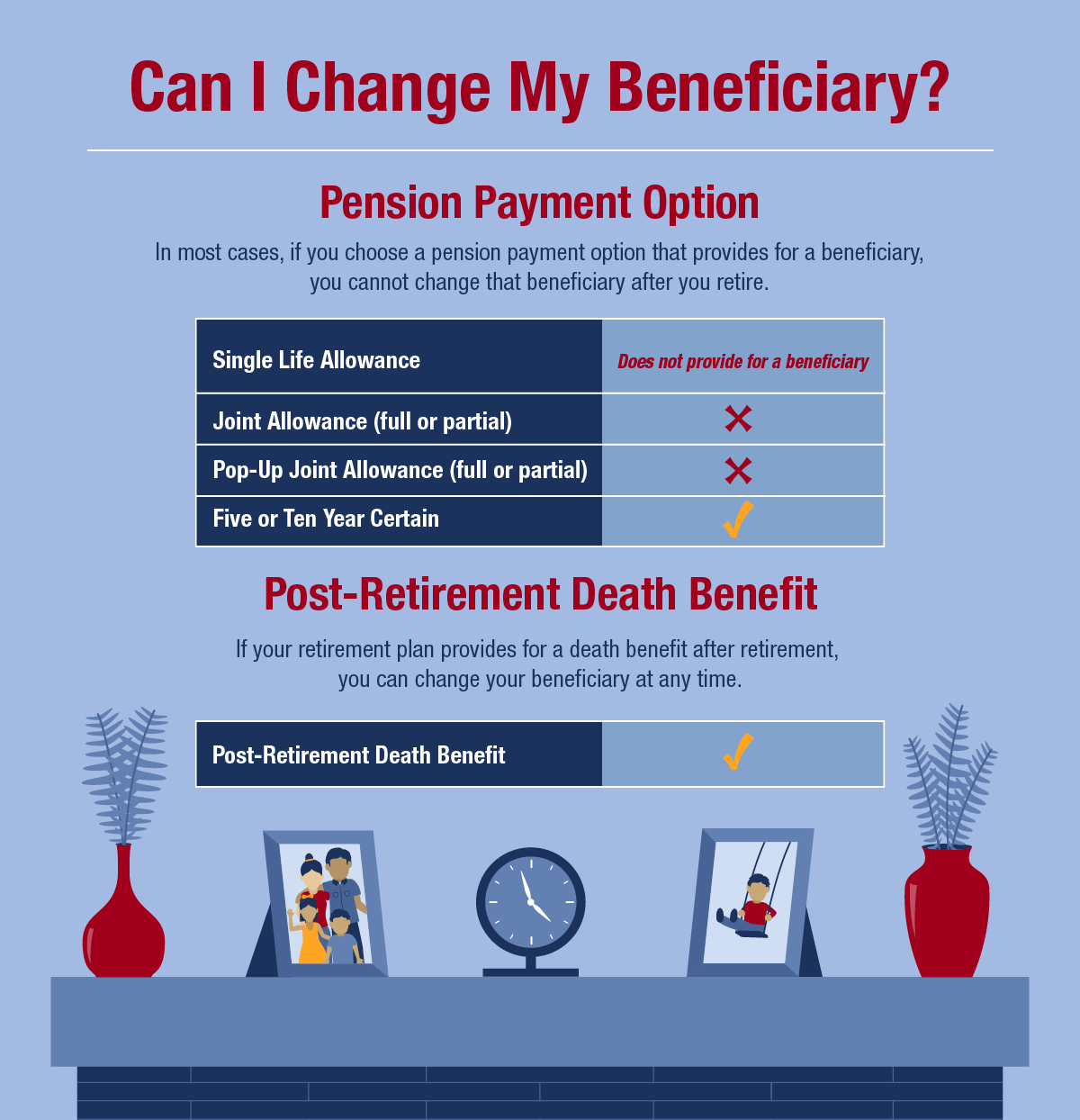
That depends. If you choose a pension payment option that provides a lifetime benefit for a beneficiary, you cannot change your beneficiary even if they die before you do. However, if you choose a pension payment option that provides a benefit for a certain period after retirement, you can change your beneficiary after you retire. Learn more about the different pension payment options and whether they allow you to change your beneficiary below.
If your retirement plan provides a one-time lump sum death benefit after you retire, you can also change your beneficiary (or beneficiaries) for that benefit.
Available Pension Payment Options
At retirement, you will choose a pension payment option:
- Single Life Allowance option: Provides the maximum monthly benefit payment to you for the rest of your life. This option does not provide a continuing benefit so you will not select a beneficiary, and all payments stop when you die.
- Joint Allowance options: Provide a lifetime benefit to a loved one in exchange for a reduction to your monthly benefit payment. After your death, your beneficiary will continue to receive your pension (or part of it, depending on the option you choose) for the rest of their life. If your beneficiary dies before you, your monthly benefit payment remains the same and all payments stop when you die. However, if you choose one of the Popup-Up/Joint Allowance options and your beneficiary predeceases you, your monthly benefit payments will increase to the amount payable under the Single Life Allowance option. For these options, you can only choose one beneficiary, and you cannot change your beneficiary after you retire.
- Five Year Certain or Ten Year Certain options: Provide a benefit for a certain period after retirement in exchange for a reduction to your monthly benefit payment. If you die within the five- or ten-year period after your retirement (depending on the option you choose), your beneficiary will continue to receive your monthly pension payment for the remainder of the five- or ten-year period. For these options, you can choose more than one beneficiary, and you can change your beneficiary after you retire.
Post-Retirement Death Benefit
Your pension is not your only NYSLRS retirement benefit. Most NYSLRS retirees are eligible to leave a death benefit if they retired directly from payroll or within one year of leaving employment. The post-retirement death benefit is a one-time lump sum payment. For information on how it’s calculated, visit our Death Benefits for Retirees page.
You can change your beneficiary for this benefit at any time, and your beneficiaries for this benefit do not have to be the same as your pension payment option beneficiary.
Manage Your Beneficiaries in Retirement Online
The fastest way to view or update your beneficiaries for your post-retirement death benefit is in Retirement Online.
- Sign in to Retirement Online.
- Look under My Account Summary.
- Click View and Update My Beneficiaries button.
You should also review the contact information for your beneficiaries so we can find them when needed.